


 日本語
日本語 English
 français
 Deutsch
 italiano
 русский
 español
 português
 العربية
 中文
中文
An optical module acts as a photoelectric converter that enables you to transfer data efficiently. It converts electrical signals into optical signals and back, supporting high-speed communication across networks. You benefit from several advantages over copper cables:
-
Higher bandwidth and speed for demanding applications
-
Reliable long-distance transmission without signal loss
-
Immunity to electromagnetic interference
-
Lower power consumption and operational costs
Understanding how an optical module works helps you make informed decisions for modern network infrastructure.
Key Takeaways
-
Optical modules convert electrical signals to optical signals, enabling fast and reliable data transmission across networks.
-
Choosing the right optical module improves network performance by matching speed, distance, and compatibility with your devices.
-
Hot-swappable optical modules allow for easy upgrades and maintenance without shutting down your network, minimizing downtime.
-
Optical modules offer advantages over copper cables, including higher bandwidth, lower power consumption, and immunity to interference.
-
Understanding the components and operation of optical modules helps you make informed decisions for your network infrastructure.
Optical Module Basics
What Is an Optical Module
You rely on an optical module to serve as a photoelectric converter in your network. This device transforms electrical signals into optical signals and then back again, enabling fast and reliable data transmission. The optical module operates at the physical layer of the OSI model. At this foundational layer, it handles the conversion between light and electrical signals, which is essential for moving data across fiber optic cables.
Note: The physical layer forms the backbone of your network’s communication. By using an optical module, you ensure that data travels efficiently and accurately between devices.
Key Components
An optical module contains several critical parts that work together to achieve seamless data conversion and transmission. You will find the following main components inside:
-
Transmitter: Converts incoming electrical signals into light signals for transmission over fiber.
-
Receiver: Changes received light signals back into electrical signals for your network devices.
-
Laser Diode: Generates the light required for sending data through the fiber optic cable.
-
Photodetector: Detects incoming light signals and converts them into electrical signals.
-
Connector: Links the module to the fiber optic cable, ensuring a secure and stable connection.
You also benefit from the hot-pluggable nature of most optical modules. This feature allows you to replace or upgrade modules without shutting down your network. You can swap modules quickly, which minimizes downtime and keeps your system running smoothly. Hot-swapping also supports network scalability, letting you adapt to growing bandwidth needs without investing in new equipment.
Tip: Hot-pluggable optical modules make network maintenance easier and more efficient. You can perform upgrades or repairs while your network remains operational.
How Optical Modules Work

Signal Conversion Process
You rely on an optical transceiver module to convert electrical signals into optical signals and back again. This process involves several precise steps that ensure data moves efficiently across your network. Here is how the signal conversion process unfolds:
-
Your network device sends electrical signals to the transmitter section of the optical module.
-
A laser diode or LED inside the transmitter converts these electrical signals into light pulses.
-
The module directs these modulated light pulses into the core of the optical fiber through a carefully aligned optical interface.
-
The light pulses travel through the fiber optic cable, maintaining high bandwidth and low signal loss.
-
At the destination, the receiver section captures the incoming light pulses and uses a photodiode to convert them back into electrical signals.
-
The module processes these signals further to ensure accurate timing and correct formatting for your network device.
Tip: You can choose between direct modulation and external modulation technologies. Direct modulation controls the current through the laser diode with the electrical signal, while external modulation uses devices like electro-optic or acousto-optic modulators for higher performance.
Data Transmission Flow
You benefit from the seamless flow of data that an optical module provides. The module handles the entire journey of your data, from the source device to the destination, by switching signals between electrical and optical forms.
-
At the transmitting end, a driver chip processes the electrical signals from your device.
-
A semiconductor laser or LED emits a modulated light signal based on these electrical inputs.
-
The optical signals travel through the fiber optic cable to the receiving end, where they experience minimal attenuation and interference.
-
A light detection diode at the receiving end converts the optical signals back into electrical signals for your device to use.
Data moves through transceivers by changing signals from one medium to another. In fiber optic systems, you convert electrical signals from network devices into optical signals for transmission over fiber optic cables, then back into electrical signals at the receiving end.
You can achieve a wide range of data rates with modern optical modules. The following table shows typical data rates and their applications:
|
Data Rate |
Application Description |
|---|---|
|
100 Mbps |
Suitable for legacy systems. |
|
1 Gbps |
Common in standard enterprise networks. |
|
10 Gbps |
Widely used in data centers and high-performance networks. |
|
25/40/100 Gbps |
For high-throughput applications in modern data centers. |
|
200/400/800 Gbps |
Emerging standards for ultra-high-speed networking. |
|
1.6T |
Hyperscale Data Center. |
You can select the right optical module based on your required data rate and network environment. This flexibility supports everything from legacy systems to the latest hyperscale data centers.
Types of Optical Modules
Common Module Types
You encounter a wide range of optical modules in enterprise networks. Each module type offers unique features and fits specific applications. The following table summarizes the most common types you will use:
|
Optical Module Type |
Description |
Key Features |
Typical Applications |
|---|---|---|---|
|
SFP (Small Form-Factor Pluggable) |
Compact, hot-swappable transceiver supporting up to 1 Gbps |
Hot-swappable; versatile standards; single-mode & multi-mode fiber compatible |
Ethernet switches, routers, NICs for short to medium range |
|
SFP+ (Enhanced SFP) |
Enhanced SFP supporting up to 10 Gbps with same form factor |
Supports 10G Ethernet & 8G Fibre Channel; cost-effective; backward compatible |
Data centers, enterprise networks, service providers for high-speed links |
|
SFP28 |
Supports up to 25 Gbps in the same SFP form factor |
Higher speed; backward compatible with SFP+ |
High-performance networks, data centers |
|
QSFP+ (Quad SFP+) |
Aggregates four channels up to 40 Gbps |
Multi-channel; high-density design |
Data center interconnects, aggregation switches |
|
QSFP28 |
Supports 100 Gbps (4x25G) |
High bandwidth; compact size |
Modern data centers, high-throughput networks |
|
QSFP-DD |
Double density QSFP supporting up to 400 Gbps |
Eight channels; ultra-high speed |
Hyperscale data centers, cloud infrastructure |
|
XFP |
10 Gbps transceiver, slightly larger than SFP+ |
Protocol independent; hot-swappable |
Telecom, DWDM and CWDM networks |
|
CFP |
Large module for up to 100 Gbps |
Designed for long-distance; high power |
Backbone and metro networks |
|
CFP2/CFP4 |
Smaller versions of CFP supporting 100G/400G |
Higher density; improved efficiency |
Carrier and data center networks |
|
CXP |
High-density module for up to 12 channels |
Supports up to 100 Gbps |
HPC, data center interconnects |
You can select the right module based on your network’s speed, density, and application requirements.
Speed, Distance, Connector
You need to match the optical module to your network’s speed and distance requirements. The following table shows typical maximum speeds for each module type:
|
Module Type |
Maximum Speed |
|---|---|
|
SFP |
4 Gbps |
|
SFP+ |
10 Gbps |
|
SFP28 |
25 Gbps |
|
QSFP+ |
40 Gbps (4x10G) |
|
QSFP28 |
100 Gbps (4x25G) |
|
QSFP-DD |
400 Gbps (8x50G) |
|
CFP |
100 Gbps |
|
CXP |
100 Gbps |
You also need to consider transmission distance and connector compatibility. Multi-mode fiber modules, such as SFP+ SR, support distances up to 500 meters. Single-mode fiber modules, like SFP+ LR or ZR, extend transmission up to 80 kilometers or more. The chart below illustrates maximum transmission distances for various module types:
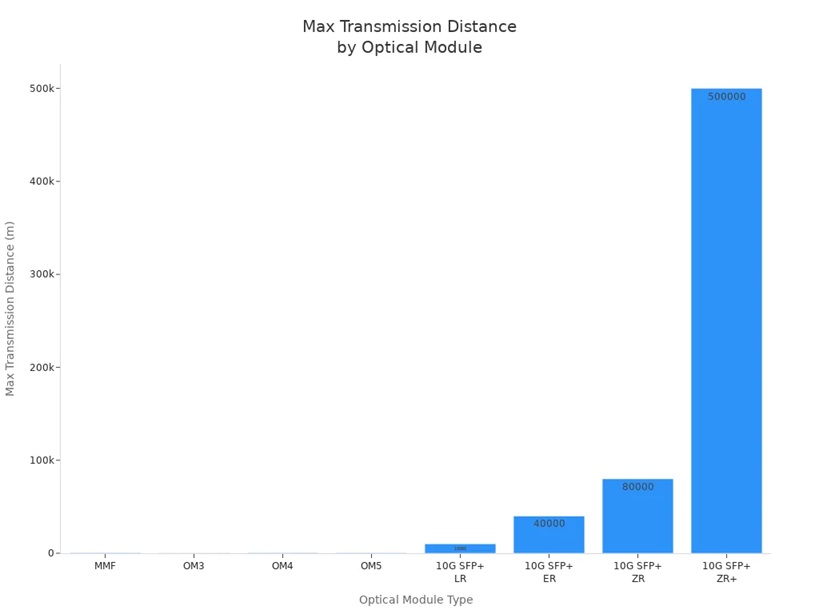
You achieve optimal performance by choosing modules that match your speed, distance, and connector needs. High-density modules, such as QSFP28 and QSFP-DD, deliver greater bandwidth and efficiency for modern data centers.
Applications and Benefits
Where Optical Modules Are Used
You see optical modules deployed across a wide range of industries and environments. Their versatility and performance make them essential for modern networks. Here are some of the most common use cases:
-
Data centers, especially those supporting artificial intelligence workloads, rely on optical modules to deliver high bandwidth and low latency. OSFP modules have become the most significant form factor, with over 100 million units projected to ship this year.
-
Leading technology companies, such as Google, use optical circuit switches to optimize AI infrastructure. Other innovators, including Lumentum, Coherent, Polatis, and iPronics, invest in these solutions to enhance network performance.
-
Telecommunications providers use optical modules to ensure secure, interference-free communication. These modules support high-speed, low-latency data transfer, which is critical for defense, surveillance, and military tactical operations.
-
Mobile command centers and remote deployments benefit from the rapid setup and flexibility that optical modules provide. You can establish secure communication channels quickly, even in challenging environments.
Optical modules play a key role in expanding bandwidth and reliability for modern network infrastructures.
Key Advantages
You gain several important benefits when you choose optical modules over traditional copper-based solutions. The table below highlights the main advantages:
|
Advantage |
Description |
|---|---|
|
High Bandwidth Capacity |
Transmit data at much higher speeds, ideal for demanding applications. |
|
Long-distance Transmission |
Maintain signal quality over several kilometers, unlike copper cables. |
|
Reduced Signal Interference |
Immune to electromagnetic interference, ensuring stable connections. |
|
Lightweight and Compact |
Easier to install and manage, reducing overall costs. |
|
Energy Efficiency |
Lower power consumption, which cuts operational costs and carbon footprint. |
You also benefit from energy savings and reduced infrastructure costs. Optical modules decrease the number of fibers needed, delay expansion expenses, and help your business operate more sustainably. Their ability to convert electrical signals into light enables faster, more efficient data transmission, which is crucial for AI workloads and high-density environments.
As energy restrictions become more common, the efficiency of optical networks becomes even more valuable for your organization.
Choosing an Optical Module
Compatibility Factors
You must ensure that your optical module matches your device and network requirements. Compatibility goes beyond just physical fit. Consider these key factors:
-
Minimize insertion loss to reduce optical signal loss during transmission.
-
Maintain low return loss to prevent signal reflection and preserve quality.
-
Reduce polarization mode dispersion for signal integrity.
-
Check extinction ratio for proper power difference between signal levels.
-
Use digital diagnostic monitoring (DDM) for real-time performance tracking.
-
Match optical fiber specifications to your actual fiber type.
-
Select modules compatible with your device interface for stable transmission.
-
Account for environmental factors like temperature and humidity.
-
Plan regular maintenance for long-term reliability.
You should also verify wavelength support and transmission speed on both ends. Use modules tested and supported by your device brand to avoid abnormal operation. Conduct switch compatibility tests before deployment to guarantee seamless integration.
Tip: Always consult vendor compatibility matrices and perform lab testing before installation. This prevents costly mistakes and ensures smooth operation.
Speed and Distance Needs
You need to match the optical module’s speed and distance capabilities to your network’s demands. The working wavelength and fiber mode determine how far your signal can travel. Multimode fiber modules (850nm or 910nm) support shorter distances, usually under 500 meters. Single-mode fiber modules (1310nm or 1550nm) enable longer transmission, often several kilometers.
Transmission protocol standards define maximum data rate, modulation type, interface, and distance. For example, 10GBASE-SR supports 10Gbps over short range, while 100GBASE-ER4 enables 100Gbps over extended distances. High-speed modules use advanced modulation formats like PAM4 to double data rates without increasing channel count.
You can scale your network by choosing modules with multiple lanes, such as QSFP28 (4x25Gbps) or QSFP-DD (8x50Gbps). This supports future upgrades and higher bandwidth needs.
Other Selection Tips
You optimize performance by considering these additional tips:
-
Increase signal transmission channels with parallel optics for efficiency.
-
Upgrade to advanced modulation formats like PAM4 for higher rates.
-
Maintain real-time monitoring and fault handling for stable operation.
Hot-swappability lets you replace or upgrade modules without shutting down your network. This minimizes downtime and supports quick upgrades as your bandwidth needs grow.
|
Aspect |
Impact on Scalability and Upgrades |
|---|---|
|
Power Consumption |
Lower module power usage reduces total cost and cooling needs. |
|
Form Factor |
Compact modules allow higher port density and easier upgrades. |
|
Reliability |
Mature hot-pluggable optics ensure long-term stability and flexibility. |
|
Operational Flexibility |
Evolving module standards support migration from 400G to 800G, 1.6T, and beyond for AI and HPC workloads. |
Avoid common mistakes like compatibility issues, electrical mismatches, optical port contamination, and ESD damage. Proper selection and handling ensure your network remains robust and scalable.
You depend on optical modules to convert electrical signals into light, enabling fast and reliable data transfer. Selecting the right module ensures your network meets speed, stability, and performance demands. The table below highlights why your choice matters:
|
Aspect |
Importance |
|---|---|
|
Speed |
Supports AI and high-bandwidth workloads |
|
Link Stability |
Maintains reliable connections |
|
Bit Error Rate |
Reduces packet loss and latency |
|
Performance Impact |
Maximizes network efficiency |
To make the best choice, always check device compatibility, required speed, and application needs. Follow these steps:
-
Identify your device and port requirements.
-
Match module type, wavelength, and distance.
-
Verify vendor and firmware compatibility.
Careful selection protects your network investment and ensures long-term reliability.
FAQ
What is the difference between single-mode and multi-mode optical modules?
You use single-mode modules for long-distance transmission. Multi-mode modules work best for short-range connections. Single-mode modules support higher speeds and longer distances. Multi-mode modules cost less and fit most local networks.
Can you hot-swap optical modules without shutting down your network?
You can hot-swap most optical modules. This feature lets you replace or upgrade modules while your network stays online. You minimize downtime and maintain continuous service.
How do you choose the right optical module for your device?
You match the module type, speed, and connector to your device specifications. Check compatibility with your network equipment. Review vendor recommendations and test modules before deployment.
What maintenance steps help optical modules last longer?
You clean connectors regularly. Monitor module performance using digital diagnostic tools. Store modules in dry, dust-free environments. Schedule routine inspections to prevent failures.
Are optical modules compatible across different brands?
You may find some modules work with multiple brands. Always check compatibility lists from your vendor. Test modules in your environment to avoid unexpected issues.

 IPv6 ネットワーク対応